Search This Blog

Showing posts with label cd. Show all posts

Tuesday, 5 April 2011

Tips: Top Ten Ways to Recycle

List of the top 10 ways to recycle at home and in the office.
  1. Buy recycled paper and print on both sides. When using paper in the office, print on both sides of the sheet and recycle the paper when you are finished. By recycling one ton of paper, you can save 17 trees, almost 7,000 gallons of water and more than three cubic yards of landfill space.
  2. Recycle your outdated technology. According to EPA, Americans throw out two million tons of e-waste each year. Avoid adding to that waste by recycling your old technology. For more information on electronic recycling, 
  3. Make recycling bins readily available. Make sure your home and office are outfitted with recycling bins for paper, plastic and metal. Keep them out in the open and label them appropriately. Sometimes the convenience factor is all that is needed.
  4. Recycle your empty ink and toner cartridges. Almost eight cartridges are thrown out in the United States every second of every day. That's almost 700,000 cartridges per day.
  5. Buy remanufactured ink and toner cartridges. Each remanufactured cartridge keeps approximately 2.5 pounds of metal and plastic out of landfills and saves about a half gallon of oil.
  6. Recycle old newspapers laying around the office. When finished reading the newspaper, either leave it for someone else to read or recycle it.
  7. Look for the recycled option in all the products you buy. It's not just paper that is recycled.
  8. Buy rechargeable batteries. It takes 1,000 regular batteries to equal the lifespan of one rechargeable battery. When you are discarding your batteries, recycle them.
  9. Purchase rewritable CDs and DVDs so that you can reuse them from project to project.
  10. Reuse your morning coffee cup. Or better yet, buy a mug to avoid the waste caused by throwing away the paper or Styrofoam.

Article Source : 

Related articles :

Wednesday, 6 May 2009

Blu-ray to DVD Pro

Blu-ray to DVD Pro 1.3

Features of Bu-ray to DVD Pro:
Perfectly splits and burns a Blu-ray movie to multiple DVDs
1:1 Blu-ray burning - 100% same to the original with absolutely no quality loss
Supports the burning of MKV files, including HD H264, Mpeg2, VC1 videos and AC3, DTS audio codec.
Excellent synchronized audio and video
Selectable burning
Saves all the subtitles and audio tracks
Multiple types of source files supported
Adds menu to the target DVD
(Note: Adding a menu will make the AVCHD disc incompatible with PLAYSTATION 3.)
Defines the characters, font, color, background picture of the menu
Pauses/Resumes the burning process
Batch copying - You can define the number of discs to be burnt
High burning speed


Wednesday, 18 March 2009

Ultraiso 9


UltraISO PE description


An easy to use utility to create, edit and convert CD image files
Along with large capacity hard disk popularity, people were already used to coping compact discs to CD/DVD image files (also called compact disc image document) , generally used is the famous ISO 9660 international standards format, therefore CD/DVD image files are called ISO files.

Because the ISO file retained complete data information of the compact disc (including compact disc boot information), you were allowed the convince to use commonly used CD burning software (for example Nero-Burning ROM ) to record the disc with your CD-R/RW over and over forever, it can also be used directly through Virtual CD-ROM drive software (for example SoftDisc ) .

UltraISO is a CD/DVD image file creating/editing/converting tool , it can directly edit the CD/DVD image file and extract files and folders from it, as well as directly make ISO files from your CD/DVD drive or hard disk. At the same time, you can maintain the ISO bootable information, thus creating your own bootable CDs and DVDs. You now have the power to make and edit your own ISO files, and then burn them to CD or DVD for your own needs.

UltraISO is in sole possession of the intellectualized ISO document format analyzer, it can process at the present time almost all types of image files, including ISO and BIN, it may even support new image files which are yet to be created. UltraISO can open these image files, directly extract files and folders, edit it and convert other image files to the standard ISO format.

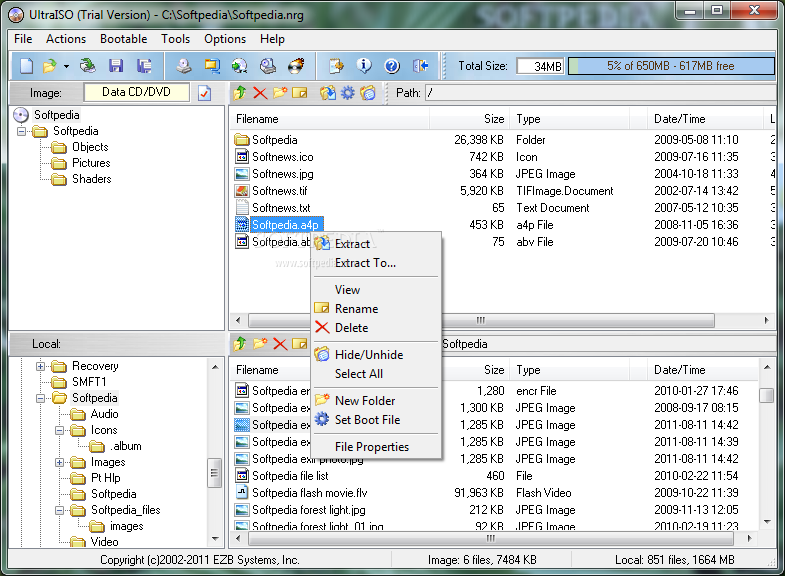
UltraISO uses the double window unification user contact interface, you have the choice to only use the quick buttons and/or the mouse Drag & Drops, you can handle any CD/DVD image file easily.

Here are some key features of "UltraISO Media Edition":

· Can directly edit the ISO image file.
· Can directly extract files and folder from ISO image file
· Can add / delete /create new directory /rename ISO file image content.
· Can make ISO file from hard disk document.
· Can create CD image from CD/DVD-ROM, maintain bootable information.
· Can process the compact disc boot information, you can directly add/remove/extract boot image of the ISO image.
· Supports nearly all known CD image file formats (.ISO, .BIN, .IMG, .CIF, .NRG, .BWI and so on) , and converts them to the standard ISO form image.
· May directly set the file/folder to hidden attribute
· Supports ISO 9660 Level1/2/3 and Joliet extension
· Automatically optimizes the ISO image file structure, saves the CD space.
· Supports the shell document type integration, Open Image files through double clicking them or the Right Click menu of the mouse with the open dialog.
· The double window user interface is extremely convenient to use.
· There are rich add-on tools, you can create ALL in 1 bootable compact discs, CD image file management, even the virtual CD/DVD drive , those functions are really powerful.


Requirements:

· Intel Pentium 166MHz or above.
· 64MB memory.
· At least 10MB free hard disk space .
· CD-ROM, CD-R/RW, DVD-ROM, the DVD-R/RW driver (copy compact disc image needs).
· Mouse.


Limitations:

· The trial version shows a pop-up registration dialog at program startup and cannot save an ISO image of greater than 300MB.


What's New in This Release: [ read full changelog ]

· Supports nature file/folder priority mode (Shift+F12
· Auto splits ISO/NRG images above 4GB on making DVD images to USB devices with FAT32 volume
· Can change time and hidden attribute of files in floppy/disk image
· Supports Vietnamese and Malaysian languages
· Can detect and use Roixo Creator 2009 as default burning software
· Can handle UDF volume with huge amount of files and folders (200K+
· Reports newly added files on 'Verify checksums' operation
· Some minor improvements and bug fixes

Nero 9 lite (new)

Nero 9 Lite
Nero 9
is the next generation of the worldв€™s most trusted integrated digital media and home entertainment software suite. It features new cutting-edge functionality that makes enjoying digital media content simple.
his easy-to-use yet powerful multimedia suite, gives you the freedom to create, rip, copy, burn, edit, share, and upload online. Whatever you want ∓ music, video, photo, and data ∓ enjoy and share with family and friends anytime, anywhere.

With easy-to-use Nero StartSmart command center, your digital life has never been more flexible, feasible, and fun.

Highlights:
- Fast and easy rip, burn, Autobackup, and copy functions
- Backup files to CDs, DVDs, and Blu-ray Discs*
- Create professional-looking DVD movies with integrated 3D menus
- Copy, burn, share, upload, and create music mixes like a DJ
- Convert music, photos, and DVDs to play on your iPodВ® and other mobile devices
- Quick photo and video upload to My Nero, YouTubeв„ў, and MySpace
- Watch, record, pause, and customize your live TV experience
- Play AVCHD and other HD formats

Included Features:
- Nero Burning ROM
- Nero Express
- Nero DiscSpeed
- Nero DriveSpeed
- Nero InfoTool
- Nero RescueAgent
- ControlCenter

Vista Portable for USB and CD


Portable version of Windows VISTA with size only 112, can launch VISTA from CD or USB Flash.

Name: Windows VISTA - Portable Edition
Year: 2009
OS: Windows Vista
Lang: eng.
Size: 112,5 MB

Saturday, 7 March 2009

Nero 9 Lite Install password

Welcome !

Your Nero 9 Lite - installer password is "nero9lite"

Enjoy !

Nero 9 lite (new)

Nero 9 Lite
Nero 9
is the next generation of the worldв€™s most trusted integrated digital media and home entertainment software suite. It features new cutting-edge functionality that makes enjoying digital media content simple.
his easy-to-use yet powerful multimedia suite, gives you the freedom to create, rip, copy, burn, edit, share, and upload online. Whatever you want ∓ music, video, photo, and data ∓ enjoy and share with family and friends anytime, anywhere.

With easy-to-use Nero StartSmart command center, your digital life has never been more flexible, feasible, and fun.

Highlights:
- Fast and easy rip, burn, Autobackup, and copy functions
- Backup files to CDs, DVDs, and Blu-ray Discs*
- Create professional-looking DVD movies with integrated 3D menus
- Copy, burn, share, upload, and create music mixes like a DJ
- Convert music, photos, and DVDs to play on your iPodВ® and other mobile devices
- Quick photo and video upload to My Nero, YouTubeв„ў, and MySpace
- Watch, record, pause, and customize your live TV experience
- Play AVCHD and other HD formats

Included Features:
- Nero Burning ROM
- Nero Express
- Nero DiscSpeed
- Nero DriveSpeed
- Nero InfoTool
- Nero RescueAgent
- ControlCenter

Monday, 2 March 2009

Vista Portable for USB and CD


Portable version of Windows VISTA with size only 112, can launch VISTA from CD or USB Flash.

Name: Windows VISTA - Portable Edition
Year: 2009
OS: Windows Vista
Lang: eng.
Size: 112,5 MB

Thursday, 26 February 2009

Ultraiso 9


UltraISO PE description


An easy to use utility to create, edit and convert CD image files
Along with large capacity hard disk popularity, people were already used to coping compact discs to CD/DVD image files (also called compact disc image document) , generally used is the famous ISO 9660 international standards format, therefore CD/DVD image files are called ISO files.

Because the ISO file retained complete data information of the compact disc (including compact disc boot information), you were allowed the convince to use commonly used CD burning software (for example Nero-Burning ROM ) to record the disc with your CD-R/RW over and over forever, it can also be used directly through Virtual CD-ROM drive software (for example SoftDisc ) .

UltraISO is a CD/DVD image file creating/editing/converting tool , it can directly edit the CD/DVD image file and extract files and folders from it, as well as directly make ISO files from your CD/DVD drive or hard disk. At the same time, you can maintain the ISO bootable information, thus creating your own bootable CDs and DVDs. You now have the power to make and edit your own ISO files, and then burn them to CD or DVD for your own needs.

UltraISO is in sole possession of the intellectualized ISO document format analyzer, it can process at the present time almost all types of image files, including ISO and BIN, it may even support new image files which are yet to be created. UltraISO can open these image files, directly extract files and folders, edit it and convert other image files to the standard ISO format.

UltraISO uses the double window unification user contact interface, you have the choice to only use the quick buttons and/or the mouse Drag & Drops, you can handle any CD/DVD image file easily.

Here are some key features of "UltraISO Media Edition":

· Can directly edit the ISO image file.
· Can directly extract files and folder from ISO image file
· Can add / delete /create new directory /rename ISO file image content.
· Can make ISO file from hard disk document.
· Can create CD image from CD/DVD-ROM, maintain bootable information.
· Can process the compact disc boot information, you can directly add/remove/extract boot image of the ISO image.
· Supports nearly all known CD image file formats (.ISO, .BIN, .IMG, .CIF, .NRG, .BWI and so on) , and converts them to the standard ISO form image.
· May directly set the file/folder to hidden attribute
· Supports ISO 9660 Level1/2/3 and Joliet extension
· Automatically optimizes the ISO image file structure, saves the CD space.
· Supports the shell document type integration, Open Image files through double clicking them or the Right Click menu of the mouse with the open dialog.
· The double window user interface is extremely convenient to use.
· There are rich add-on tools, you can create ALL in 1 bootable compact discs, CD image file management, even the virtual CD/DVD drive , those functions are really powerful.


Requirements:

· Intel Pentium 166MHz or above.
· 64MB memory.
· At least 10MB free hard disk space .
· CD-ROM, CD-R/RW, DVD-ROM, the DVD-R/RW driver (copy compact disc image needs).
· Mouse.


Limitations:

· The trial version shows a pop-up registration dialog at program startup and cannot save an ISO image of greater than 300MB.


What's New in This Release: [ read full changelog ]

· Supports nature file/folder priority mode (Shift+F12
· Auto splits ISO/NRG images above 4GB on making DVD images to USB devices with FAT32 volume
· Can change time and hidden attribute of files in floppy/disk image
· Supports Vietnamese and Malaysian languages
· Can detect and use Roixo Creator 2009 as default burning software
· Can handle UDF volume with huge amount of files and folders (200K+
· Reports newly added files on 'Verify checksums' operation
· Some minor improvements and bug fixes